

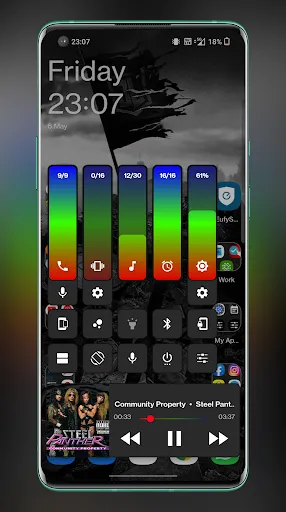
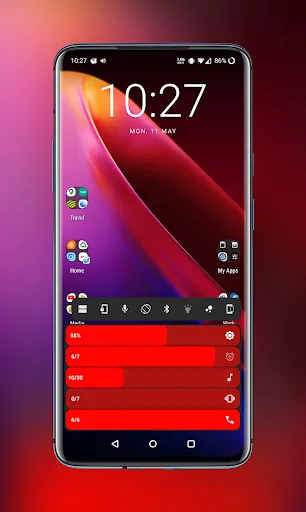
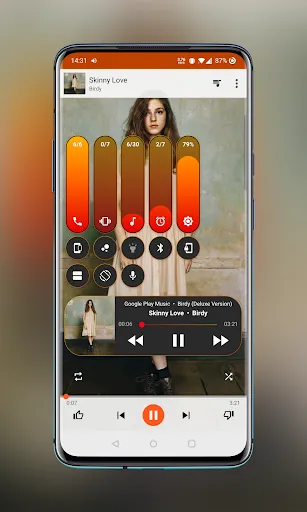
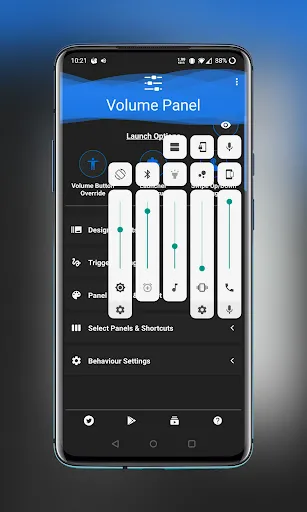
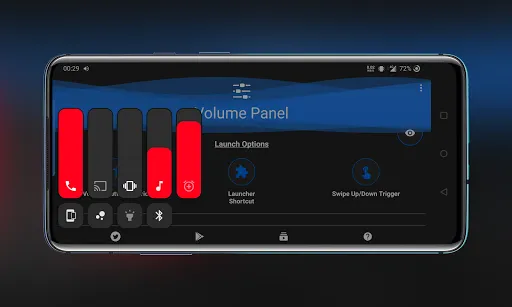
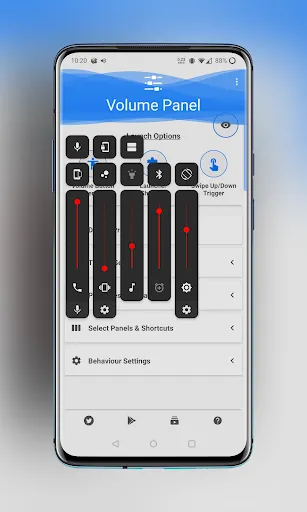
Have you ever felt that the normal Android volume panel is too simple for the way you use your phone? Sometimes you only want to change the media volume, but the standard controls do not give you enough options to make everything look the way you want. Volume Control Panel Pro gives you a completely different way to control your phone’s sound. You can replace the default volume panel with your own design, adjust different audio streams, create profiles, use an equalizer, and even add shortcuts for faster access. It is a pretty interesting choice for people who enjoy customizing every little part of their Android device.
Introduction to Volume Control Panel Pro
Volume Control Panel Pro is an Android customization application focused on volume and audio control. Instead of using the standard Android volume interface, you can create a panel that fits your own style. The Theme Studio lets you use your own images, colors, gradients, transparency, rounded corners, sliders, icons, and text. You can even prepare different layouts for portrait and landscape mode.
There is much more than appearance here. The application can manage Media, Ring, Notification, Alarm, Call, and System volume, while additional tools provide audio profiles, stream locking, widgets, quick settings, and a Graphic Equalizer. Some functions depend on your Android version, device, media application, and audio output, but when supported, they can make everyday sound control much more convenient. If you like having more control over how your Android phone looks and works, this application gives you plenty of things to explore.
Create Your Own Volume Panel
The default Android volume panel does its job, but it does not give you many choices. With Volume Control Panel Pro, you can change almost every visual part of the panel and create something that feels more personal.
You can start with a simple design or make a colorful panel with your favorite image. The application lets you preview your work before using it, and themes can also be imported or exported. This makes it easier to keep your favorite design or move it between setups.
Theme Studio
Theme Studio is where most of the visual customization happens. You can use your own pictures as the surface of the volume panel and choose custom colors or gradients for the interface.
There are also options for transparency, rounded corners, sliders, thumbs, icons, and text. You can change the text scale if the controls are difficult to read and prepare separate portrait and landscape layouts. Whether you prefer a clean minimal panel or something much more noticeable, you can build it yourself.
Control Different Audio Streams
Volume Control Panel Pro is useful when you need to manage more than just media sound. It gives you access to several Android audio streams, including Media, Ring, Notification, Alarm, Call, and System volume.
Having these controls together can save you from opening different settings pages. You can quickly adjust the sound level you need and leave the other audio settings alone. This is especially convenient when your phone has different volume requirements throughout the day.
Improve Your Sound
If you enjoy adjusting the way your music and other media sound, the built-in Graphic Equalizer gives you more control. You can adjust frequency bands and change the sound to better match music, videos, games, or normal listening.
There is also an Experimental Media Boost feature on supported devices. However, this function does not work exactly the same everywhere because compatibility depends on the Android version, device, media app, and audio output. So, you may need to try it on your own device to see how well it works.
Audio Profiles
You do not always want the same volume settings. A comfortable level for watching a movie at home may be completely different from what you need when working, traveling, or playing games.
Volume Control Panel Pro lets you create and switch between Audio Profiles for situations such as home, work, gaming, travel, night-time, music, and movies. You can set the volume levels for each profile and quickly change them whenever your situation changes.
App Profiles
The application can also use optional app profiles where supported. This means you can prepare a particular audio setup for a specific application and have it applied when that app opens.
For example, you may prefer one sound level when playing games and another one when watching videos. Instead of changing everything manually every time, the profile can help start the activity with the settings you prefer.
Lock Your Volume Levels
Have you ever accidentally pressed a volume button and suddenly changed the sound level? Stream Locking is designed to help prevent this kind of problem.
You can lock supported streams such as Media, Ring, Notification, Alarm, or Call. Once locked, the selected volume level is protected from unwanted changes caused by hardware buttons, applications, or accidental touches. If you want to change it later, you can simply unlock that stream.
Widgets and Quick Controls
You do not need to open the full application whenever you want to change your volume settings. Volume Control Panel Pro provides several ways to reach the controls quickly.
Home Screen Widgets
You can place volume widgets directly on your home screen. This gives you a convenient shortcut to the controls you use most often.
Quick Settings and Shortcuts
The application also supports Launcher shortcuts, Quick Settings Tiles, a Floating Trigger, and Volume Button Override where supported. These options can be especially helpful if your physical volume buttons are difficult to reach, worn out, or simply not convenient to use.
Media and Device Controls
The application goes beyond replacing the volume slider. Depending on your device and permissions, you can access supported media playback controls and Cast volume from the same area.
It can also provide controls for screen brightness, Ring, Vibrate, Silent modes, and Do Not Disturb where available. Putting these options together can make the volume panel feel more like a small control center rather than just a place to increase or decrease sound.
Accessibility Service
Some of the advanced functions use Android’s AccessibilityService API. This is optional and is used for features such as detecting volume button presses, displaying the custom volume panel overlay, Floating Trigger, Volume Button Override, and detecting active apps for optional app profiles.
According to the provided information, the application does not read screen text, record audio, capture passwords, read messages, or share AccessibilityService data with LeeDrOiD Labs or third parties. You can also disable the accessibility permission at any time through Android settings.
MOD APK version of Volume Control Panel Pro
MOD feature
Pro Unlocked
Download Volume Control Panel Pro MOD APK for Android
Volume Control Panel Pro is a pretty useful application if the normal Android volume controls are not enough for you. It gives you a lot of freedom to design your own volume panel while also adding practical tools for controlling different audio streams, creating profiles, locking volume levels, adjusting sound with an equalizer, and accessing quick controls.
The best part is that you do not have to use the same design as everyone else. You can choose your own images, colors, sliders, icons, and layouts, then keep your favorite controls close at hand with widgets and shortcuts. If you enjoy customizing your Android phone and want better control over its sound, Volume Control Panel Pro is definitely an application worth trying.


